
PillEye – tablet, pill counter
MedilityMedical
3.8322.00 Reviews
- Version
- 3.13.2
- Installs
- 500.00K
- Age Rating
- Everyone
Screenshots
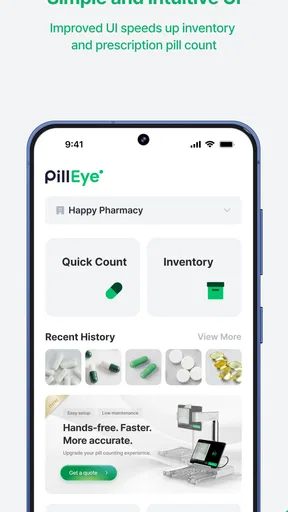
Our Review of PillEye – tablet, pill counter
 Analysis by Appyee
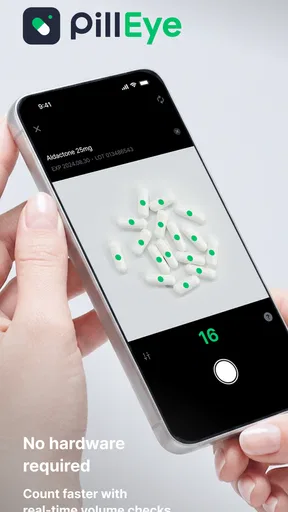
Counting tablets sounds simple until several look alike, the surface is crowded, or you lose your place halfway through. I know the small frustration of starting over just to feel confident in a count. PillEye – tablet, pill counter is designed for that narrow but useful task: it uses a phone camera to estimate how many pills are in view. I see it as a practical counting aid, not a substitute for checking medication labels, dispensing instructions, or a pharmacist’s judgement.
A counting shortcut, not a medication manager
That distinction matters. PillEye is a medical app from Medility, but its central job is counting tablets and pills from an image. It is not the tool I would rely on to decide which medicine to take, calculate a dose, or verify that a prescription is correct. If I were using it around a treatment routine, I would keep the label and my normal medication records as the source of truth, and use the camera count only to save time on a visual tally.
For a pharmacy worker, a caregiver, or someone sorting a household supply, that focused approach can be handy. For a person who wants reminders, refill alerts, interaction checks, or a complete medication schedule, a dedicated medication-management app is a better fit. PillEye’s value is clearest when the question is simply, “How many are here?”
Trust starts with the job you give it
When an app handles images of medicines, I think carefully about what I am asking it to do. A count can help with stock checks or organizing a supply, but a visual estimate should not be treated as confirmation that a dose is safe. Tablets may overlap, blend into a surface, or appear similar even when they are different products. I would separate different medicines before counting whenever the result matters, then compare the count with the packaging or an independent tally.
The app has an average rating of around 3.9 from about 1,600 ratings, and it has passed the half-million-install mark. Those figures suggest that many people have tried it, while the rating also reminds me not to assume every scan will suit every setup. I would judge it by whether it performs reliably on my own tablets and lighting, rather than treating popularity as proof of accuracy.
What I would check before relying on a scan
My first check would be the physical setup: place pills on a clean, plain surface, spread them so their edges are visible, and avoid shadows or glare. That is not just a way to help the camera. It also makes it easier for me to notice if two tablets are touching or one is partly hidden. If the displayed result looks surprising, I would change the arrangement and scan again instead of accepting the number because it appeared quickly.
I would also keep the purpose of each count in mind. A rough household inventory has more room for a second look than a count used while preparing medication for someone else. For any professional or safety-sensitive use, a camera result should sit inside the workplace’s normal checking process, not replace it. No counting app can identify a pill’s correct use merely by returning a number.
The Magic Behind PillEye
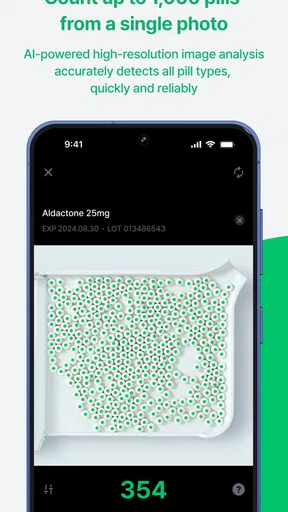
First things first, let's talk about how PillEye works. It's like having a little pharmacist in your pocket. You simply open the app, point your camera at the pills you want to count, and voilà, the app does the heavy lifting for you. It uses advanced image recognition technology to detect and count the pills in seconds. No more manual counting and definitely less room for error.
Getting Started
Downloading the app was a breeze. It is free to install and is rated for Everyone, which makes the age label broad, though the subject is still medication handling. It was released on December 9, 2020, and the current version is 3.9.2; Android devices need version 6.0 or later. I would check that the app is available for my device before planning a workflow around it, especially if I am using an older phone or tablet.
Once installed, you’re greeted with a clean, intuitive interface that even my tech-challenged aunt could navigate. The app guides you through the process with easy-to-follow instructions, so you’re never left guessing what to do next. In practice, I would take a moment to learn the framing that gives a clear view of the tablets, then use the same setup for repeat counts. Consistency makes it easier to spot when a new result deserves another look.
Using the App
I decided to test it out with a bottle of vitamins I had lying around. I placed the pills on a flat surface, opened the app, and aimed my camera at them. The app quickly scanned and displayed the count. I was impressed by how fast and accurate it was. It even handled different shapes and sizes of pills without a hitch.
A realistic use for me would be checking a vitamin bottle before a trip: I could count what is left, compare it with the number of days I expect to be away, and decide whether I need to pack another container. I would still check the label and my planned schedule rather than use the scan to set a dose. The benefit is less tedious recounting while packing, not a medical decision made by the camera.
For a caregiver organizing several containers, I would count one medicine at a time and keep each result tied to the correct bottle before moving on. Mixing different tablets in one frame may save a step, but it also makes a mistaken association easier. Separating them is a useful trade-off: a little more handling in exchange for a clearer visual check and less ambiguity about which count belongs to which supply.
Features Worth Mentioning
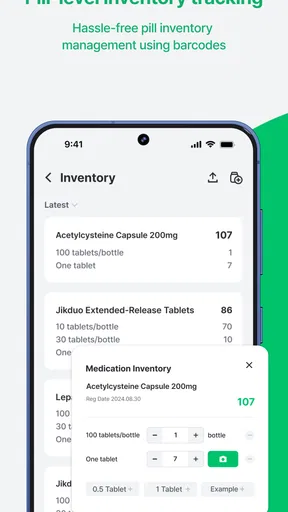
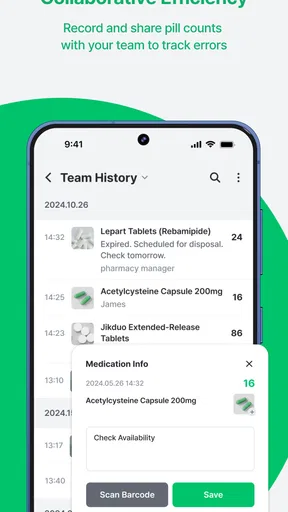
One of the standout features is the ability to save your counts for future reference. This can be incredibly useful if you’re managing multiple medications or running a pharmacy. The app also supports batch counting, so you can count multiple types of pills at once. Plus, there’s an option to export your data, which is a godsend for keeping track of your medication history or sharing with healthcare providers.
Saved counts and batch work can be most useful when the same inventory task comes around repeatedly. I would use a saved result as a reference point, not as proof of what is currently in a container: pills may have been taken, moved, or added since the last count. If I export or share a count, I would review what I am sending and make sure the recipient can interpret it correctly. A number without the medicine’s identity and context can be easy to misunderstand.
That is also where this app differs from the usual alternatives. Manual counting is slower, but it is transparent: I can see each tablet and keep my place with a tray or small groups. A general camera or notes app can preserve a picture or a written tally, but it will not do the counting work for me. PillEye aims to bridge that gap. I would choose it for repeated visual tallies, while keeping a manual recount for an unusual result or a high-stakes check.
Accuracy and Reliability
Now, I know what you’re thinking: Can an app really count pills better than the human eye? In my experience, yes. The accuracy was spot on, and the app seemed to improve the more I used it. It’s like it learns from each scan, refining its ability to detect and count pills.
I would be cautious about interpreting a changing result as the app learning my particular medicines. For a dependable workflow, I would treat each scan as a fresh estimate and verify it when the count matters. A useful habit is to take a second image after shifting or spreading the tablets; if the result changes, I know the setup may be affecting the count and should not rely on the first number alone.
Lighting and arrangement are practical limits, not minor details. A glossy tablet under a strong reflection, a dark pill on a dark counter, or a pile with overlapping edges can make visual separation harder. I would try indirect, even light and a contrasting surface, then check the outline of every tablet if the count seems off. If repeated scans remain inconsistent, manual counting is the sensible fallback.
Who Will Benefit Most?
If you’re someone who regularly counts pills, whether for personal use or professionally, PillEye is a game-changer. It takes the tedium out of the task and adds a layer of accuracy that’s hard to match manually. It’s also great for caregivers managing medications for others, ensuring doses are correctly measured.
I think it is best suited to people who have a recurring counting task and are willing to check the result rather than accept it blindly. A pharmacy may find a camera-assisted tally useful as one step in stock handling, and a caregiver may appreciate a quicker way to check remaining supply before arranging a refill. Someone counting a small number of tablets once in a while may find that laying them out and counting by hand is just as quick.
I would skip it if the real need is medication advice, identity verification, or a complete record of doses taken. A pill counter cannot tell me whether a tablet is the right one for a person, whether it is expired, or whether it should be taken now. People who need help with those decisions should use their prescription information and ask a pharmacist or clinician, rather than expecting a count to answer a different question.
A Few Things to Keep in Mind
While the app is generally fantastic, it does require good lighting and a steady hand for the best results. I found that it occasionally struggled with very small or uniquely shaped pills, but these instances were rare. Just make sure you have enough light and a stable surface to lay the pills on, and you’ll be golden.
There is a small but important workflow trade-off: arranging pills for a clear image takes time, so the app is not automatically faster when there are only a few tablets. For a larger or repeated count, the camera can reduce the effort of keeping a running tally; for a handful, I would simply count them carefully. I would also avoid scanning directly from a crowded bottle opening, because a clear, separated view is easier to inspect than pills hidden behind one another.
The app is free to download, with in-app purchases ranging from about $7.49 to $25.99 per item. I would start with the free functionality and decide whether a paid option is worthwhile only after identifying a specific need in my own routine. The listed price range does not by itself tell me which purchase is useful for a particular user, so I would review the in-app choices before paying rather than assume every feature is included.
Privacy, choices, and practical confidence
My trust check is deliberately simple: I look at what the app asks me to do on screen and what choices it visibly gives me before I use it with sensitive information. Because the task involves medicine, I would avoid including labels, prescription paperwork, or other personal details in a camera view unless they are needed for the count. Keeping the frame focused on the tablets is a good habit regardless of where an image is processed.
I also would not assume that a saved count is a full medication record. A count can be helpful to revisit, but it is not the same as a dated dose log or a confirmed inventory unless I maintain that context myself. If I need a record for a caregiver or clinician, I would pair the count with clear notes about the container and when I checked it, then make sure I am comfortable with what I choose to share.
Before making PillEye part of a regular routine, I would test it with a low-stakes count and compare the result with a careful manual tally. I would repeat that check when I change the surface, lighting, phone position, or tablet type. This is a practical way to learn whether the camera workflow is dependable in my setting without letting convenience turn into overconfidence.
For anyone wondering whether it works offline or what happens to captured images, I would check the app’s current on-screen prompts and privacy information before using it with sensitive material. I would not infer those details from the act of taking a picture. The useful user choice is to keep scans limited to what is needed, avoid photographing identifying paperwork, and stop if the app asks for access or sharing that does not fit the task.
Final Thoughts
Overall, PillEye – tablet, pill counter is a must-have for anyone who deals with pills regularly. It’s a simple yet powerful tool that delivers on its promises. Whether you’re a professional or just want to make your medication management a bit easier, this app is worth the download. So, next time you find yourself squinting at a bottle of pills, remember there’s an app for that.
My recommendation is more measured: I would try it as a convenience for visual counting, particularly if I repeat the task, but I would keep a manual check for anything that affects medication safety. The 3.9 average and the broad base of use make it a reasonable option to investigate, not a guarantee that every tablet and camera setup will produce a dependable result. Its best role is a second set of eyes that saves effort; when certainty matters, the final check should remain deliberate and human.
Verdict
Strengths of PillEye – tablet, pill counter
- Accurate pill counting algorithm.
- User-friendly interface design.
- Supports multiple languages.
- Integrates with healthcare apps.
- Quick setup and easy navigation.
Limitations of PillEye – tablet, pill counter
- Limited to tablet-shaped pills.
- Requires consistent lighting conditions.
- No offline mode available.
- Subscription needed for full features.
- Occasional app crashes reported.
Similar Picks in This Category
View All
WebMD: Symptom Checker
WebMD, LLC4.1

Microphone Amplifier
DOSA Apps4.2

Anatomy Learning - 3D Anatomy
3D Medical OU4.5

Period Tracker and Calendar
SimpleInnovation4.9

GoodRx: Prescription Coupons
GoodRx4.8

CVS Health
CVS Pharmacy4.5
Frequently Asked Questions
What is PillEye and how does it work?
PillEye is an innovative app designed to assist users in accurately counting and managing their medication. By using your device's camera, PillEye can quickly and precisely count pills, ensuring you have the right dosage. It helps prevent errors in medication management, making it ideal for both personal use and healthcare professionals.
Is PillEye available for both Android and iOS?
Yes, PillEye is available for download on both Android and iOS platforms. Users can find it on the Google Play Store and the Apple App Store, making it accessible to a wide range of smartphone and tablet users. Ensure your device meets the app’s system requirements before downloading.
Does PillEye require an internet connection to function?
PillEye operates primarily offline, allowing you to count pills without an internet connection. However, some features, like updates or cloud backups, might require connectivity. This offline capability ensures that you can use the app in locations with limited or no internet access.
How secure is my data with PillEye?
PillEye prioritizes user privacy and data security. The app employs encryption to protect your information and offers features like secure backups. Users should review the app’s privacy policy to understand how data is managed and ensure their personal information remains confidential.
Can PillEye integrate with other health apps or devices?
PillEye offers integration capabilities with various health apps and devices, allowing users to streamline their health management. Check the app settings for available integrations and compatibility with your current health tech ecosystem. This feature enhances the app’s functionality, providing a comprehensive health management experience.
